Introduction
Apple has officially released macOS Tahoe 26, the newest version of its Mac operating system, delivering a visually stunning Liquid Glass design, smarter Spotlight search, and the long-anticipated Phone app that brings iOS call features directly to Mac. Announced at WWDC 2025 and tested through betas, Tahoe 26 feels like a substantial leap for macOS, not just another incremental update.
This release also marks a historic moment—Tahoe 26 will be the last major macOS version to support Intel-based Macs with Apple’s T2 Security Chip, drawing a firm line as Apple pushes further into its own silicon ecosystem.
Let’s dive into all the new features, design changes, and Apple Intelligence-powered tools that make macOS Tahoe 26 one of the most important updates in years.
🌟 Liquid Glass Design: A New Era for macOS
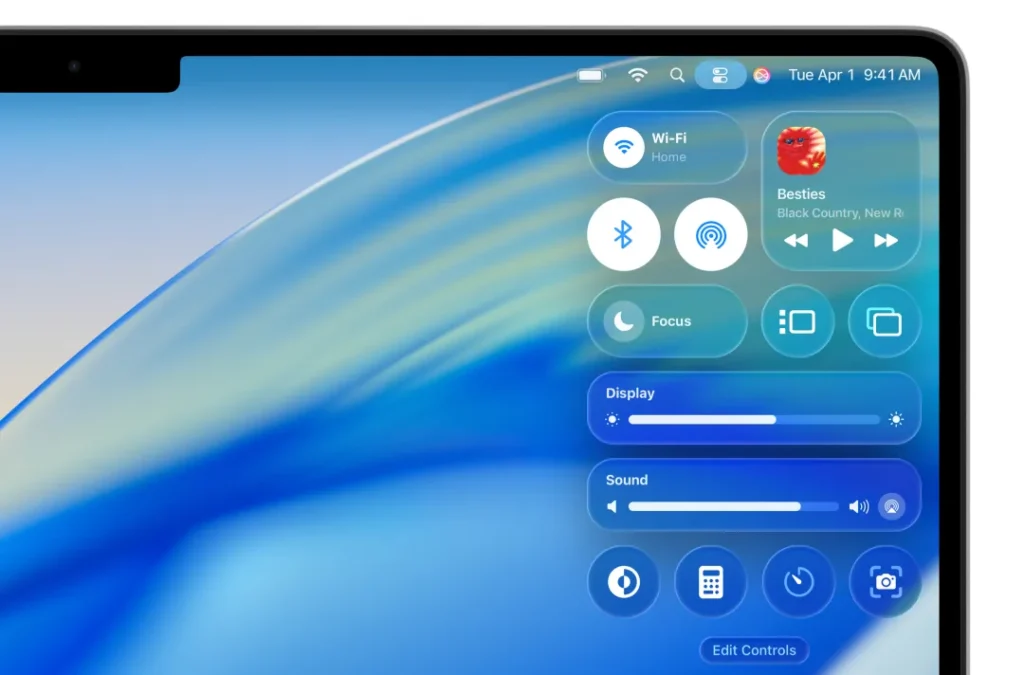
Perhaps the most noticeable and talked-about update is Apple’s new Liquid Glass design language, transforming macOS into a sleeker, more transparent experience.
- Windows, menus, and buttons now use subtle transparency layers, giving Mac desktops a modern, glass-like effect.
- The menu bar is now fully transparent, blending seamlessly with backgrounds and making displays appear larger.
- Notifications and system alerts also adopt the same liquid-like textures, improving readability while looking futuristic.
This new design isn’t just visual polish—it emphasizes clarity and focus, reducing visual clutter while making navigation fluid.
🔍 Smarter Spotlight Search
Spotlight has evolved from being just a search tool into a powerful productivity launcher. With macOS Tahoe 26:
- Results are ranked by relevance, learning from your daily usage habits.
- Without opening apps, you can now use Spotlight to:
- Send emails
- Create notes
- Set reminders
- Perform quick actions directly from search
For Mac power users, Spotlight is now more than a shortcut; it’s a personal assistant integrated into the OS.
And for those who enjoy custom organization, Apple has added the ability to change folder colors and even add emojis—making desktops cleaner and more personal.
📞 The New Phone App
One of the most exciting additions is the Phone app, finally bridging iOS and macOS communication even further. The Mac now acts as an extension of your iPhone for seamless call management.
The Phone app includes:
- Access to call logs, recents, and voicemails
- Call Screening: Unknown numbers can be auto-answered by AI to avoid spam
- Hold Assist: Apple Intelligence stays on the line until a real agent responds
- Live Translation: Translate spoken words during phone calls and FaceTime in real time
This transforms the Mac into a complete communication hub, especially for professionals who constantly juggle calls and work simultaneously.
🤖 Apple Intelligence Comes to macOS Tahoe 26
Apple is deepening its commitment to AI-powered experiences with Tahoe 26:
- Live Translation for texts, messages, audio calls, and FaceTime.
- Smarter suggestions across apps like Mail, Messages, and Notes.
- AI-assisted call management tools like Call Screening and Hold Assist.
With Apple Intelligence integrated at the system level, macOS users can expect more personalized, context-aware workflows without sacrificing privacy.
💻 End of the Road for Intel Macs
An important note for long-time Mac users: macOS Tahoe 26 is the final major update for Intel Macs relying on the Apple T2 Security Chip.
This signals:
- Apple is committing fully to its M-series silicon future.
- Intel users will receive security updates for a limited period but no major upgrades beyond Tahoe.
If you’re still using an older Intel Mac, Tahoe 26 might be your last chance to enjoy fresh macOS features before considering an upgrade to Apple Silicon.
📌 Other Notable Features
- Folder customization with colors and emojis for easier organization.
- FaceTime improvements for clearer interactions alongside live translations.
- Performance Boosts: Faster animations, smoother multitasking, and better memory optimization.
- Privacy Features: More transparency on data control and app permissions.
👍 Pros and 👎 Cons of macOS Tahoe 26
Pros
✅ Beautiful Liquid Glass UI design feels modern and refreshing
✅ Smarter Spotlight search boosts productivity instantly
✅ The Phone app makes Macs more connected to iPhones than ever
✅ AI-powered features like Call Screening and Live Translation
✅ Enhanced customization for folders and workspace personalization
Cons
❌ Intel Macs stuck on Tahoe 26—no future upgrades
❌ Heavy use of transparency may affect performance on older models
❌ Some Apple Intelligence features limited to newer M-series Macs
❌ Users may need time to adjust to the new transparent UI

Who Should Upgrade?
- M-series Mac users: Absolutely upgrade! The new features + AI enhancements are tailored for modern hardware.
- Intel T2 users: Upgrade if your Mac supports Tahoe 26, but prepare for this being the final version you’ll get.
- Older non-T2 Intel Macs: Unsupported. It’s time to consider a new MacBook or Mac mini.
Final Thoughts
macOS Tahoe 26 is not just a yearly refresh—it’s a bold step into the future of Mac computing. With its Liquid Glass redesign, powerful Spotlight, and the long-awaited Phone app, Tahoe 26 delivers changes that feel practical and exciting.
For professionals, the AI-driven tools and integrated communication features offer real workflow improvements. And while this is the last hurrah for Intel Macs, it also clearly signals Apple’s forward path with silicon-powered intelligence.
If you own a compatible Mac, whether Intel or Apple Silicon, macOS Tahoe 26 is a must-download update that transforms your daily Mac experience.