


A Game-Changing Update for the Xbox PC App
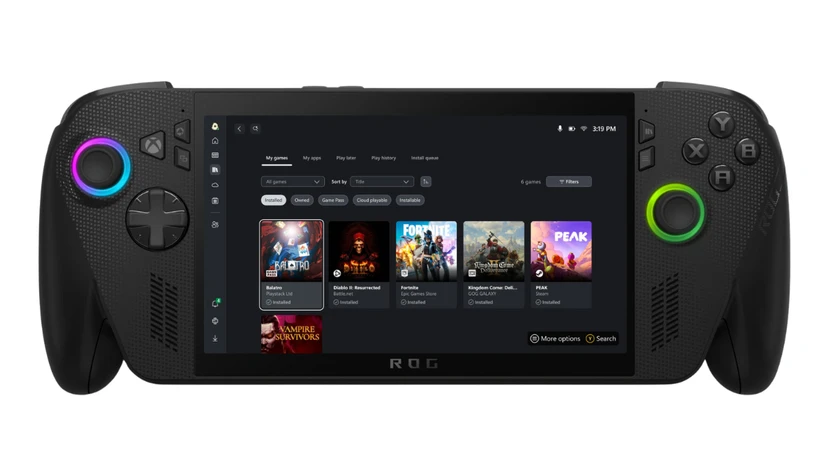
Microsoft has officially rolled out an important update to its Xbox PC app for Windows, transforming it into a universal launcher for PC games by integrating titles from Steam, Battle.net, Epic Games Store, and more. This new aggregated gaming library feature consolidates all installed games from supported storefronts into one convenient location, dramatically streamlining game access for players across PC and Microsoft’s handheld devices like the upcoming Xbox Ally.
By automatically listing installed games in the “My Library” section and the “Most Recent” sidebar, gamers can jump back into their favorites with just a single click. The update aims to make the Xbox PC app the ultimate hub for PC gaming—for desktop users and handheld gamers alike.
Key Features of the Update
Aggregated Gaming Library
- Automatically detects and displays games installed from multiple PC storefronts including Steam, Xbox library, Xbox Game Pass, Battle.net, Epic Games Store, and more.
- Consolidates all titles into a unified view, saving time switching between launchers.
- “Most Recent” list helps revisit games quickly without searching independently.
My Apps Tab
- Newly added section brings third-party apps and storefronts together.
- Enables quick installing and launching of rival storefronts, browsers, and gaming utilities without leaving the Xbox app.
- Especially useful for handheld devices, offering a seamless app-launching experience.
Control Over Storefront Visibility
- Toggle storefronts on/off in Settings > Library & Extensions to hide unwanted game sources.
- Customized library views ensure a clutter-free and tailored game collection appearance.
Just Pick Up and Play (Coming Soon in September)
- Sync recent game history and cloud-playable titles across consoles, PCs, and handhelds.
- “Jump back in” feature on the Home screen lets users resume gameplay instantly across any Xbox-enabled device.
- Stream cloud-playable games directly, saving device storage and supporting handheld play.

Why This Update Matters
Microsoft’s strategic update addresses several gamer pain points by unifying fragmented gaming libraries into a single, navigable interface. For PC gamers juggling multiple digital stores, managing installs and launching games became cumbersome—requiring individual launchers or desktop shortcuts.
This new Xbox app update changes the game by:
- Providing a centralized, full-screen experience optimized for upcoming handheld devices like Xbox Ally.
- Enhancing cross-device gaming continuity with cloud sync for game history and playable titles.
- Reducing launcher fatigue and simplifying game discovery.
Moreover, the integration of popular stores such as Steam and Battle.net means gamers can finally enjoy a seamless ecosystem regardless of their preferred platform.
Pros and Cons of the New Xbox PC App
| Pros | Cons |
|---|---|
| 🎮 Unifies games from multiple stores into one app | ⚙️ Some launchers still run in the background launching games |
| ⏱️ Quick access to most recently played games | 🔧 Initial rollout may have minor bugs or UI inconsistencies |
| 🖥️ New “My Apps” tab supports easy install and launch of third-party storefronts | 🔄 Cross-device sync (Just Pick Up and Play) arriving later, not immediately available |
| ☁️ Cloud-playable titles reduce storage need (especially for handhelds) | 👾 Limited customization options beyond toggling storefront visibility |
| 🔄 Cross-device play history keeps gaming continuous across PC, console, handheld | 📅 Supports primarily Windows OS only, no macOS or Linux integration yet |
| 📱 Tailored UI for handheld devices like Xbox Ally | 💡 Some gamers may prefer using native store apps for exclusive features |
How to Use the Aggregated Gaming Library on Xbox PC App
- Update Your Xbox PC App: Ensure the latest version of the Xbox PC app is installed from the Microsoft Store.
- Automatic Game Detection: Games installed from supported storefronts will automatically appear in “My Library” and “Most Recent” lists within the app.
- Customize Library: Go to your profile picture > Settings > Library & Extensions to toggle storefronts visibility on or off.
- Explore My Apps Tab: Access and manage third-party apps or storefronts easily without switching desktop modes.
- Get Ready for Just Pick Up and Play: Anticipate a seamless cloud sync experience that propagates across your devices later in September.
What This Means for Handheld Gamers and the Xbox Ally
The Xbox Ally handheld device launches in October, and this update is integral to its design philosophy. Unlike PC desktops, handhelds benefit enormously from the unified library and My Apps tab—keeping gaming and app management intuitive on a smaller form factor. Streaming cloud titles will also help overcome hardware limitations, enabling a smoother gaming experience without worrying about local storage or performance constraints.

Conclusion
Microsoft’s Xbox PC app update is a significant step toward simplifying and enhancing the PC gaming experience. By integrating Steam, Battle.net, and other leading storefronts into a single app, alongside new features like My Apps and cross-device sync, Xbox solidifies its position as the go-to launcher for Windows PC and handheld gamers.
For gamers seeking quicker game launch, seamless cross-device play, and an organized game library, this update delivers tangible value. Keep your Xbox PC app updated to enjoy this innovative all-in-one gaming ecosystem and get ready to “just pick up and play” wherever you go.


