
If you’re one of the 1.5 billion users of Google Photos, exciting changes are coming your way! Google has officially unveiled a set of groundbreaking AI-powered creative tools that allow users to animate still images and remix them into stunning anime, 3D, and stylized artworks — all with just a few taps.
The update turns Google Photos from a photo storage platform into a powerful creative studio. Whether you want to make a dynamic video from a childhood photo or turn your pet into a 3D cartoon, the possibilities are now virtually endless.
Let’s break down how these new tools work, how to access them, and why they’re changing the way we experience our digital memories.
🎞️ Photo to Video: Breathe Life into Still Pictures
What is the Photo to Video Feature?
Powered by Google’s Veo 2 AI model, the Photo to Video tool transforms a single still photo into a six-second animated video. This isn’t a slideshow or simple zoom effect — it’s true animation with subtle facial movements, eye blinks, and background dynamics that make your photos feel alive.
How to Use It:
- Open your Google Photos app (Android or iOS).
- Tap on any image in your gallery.
- Select the “Create” tab (newly introduced).
- Choose “Subtle movements” for realistic motion or “I’m feeling lucky” for a randomized animation.
- Let the AI process the image — within seconds, your animated clip is ready to share.
Whether it’s an old vacation selfie or a black-and-white photo of your grandparents, this tool turns static pictures into emotionally engaging videos perfect for sharing on social media or with family.
🎨 Remix Photos: From Snapshots to Stylized Masterpieces
Meet Remix – Your AI Artist
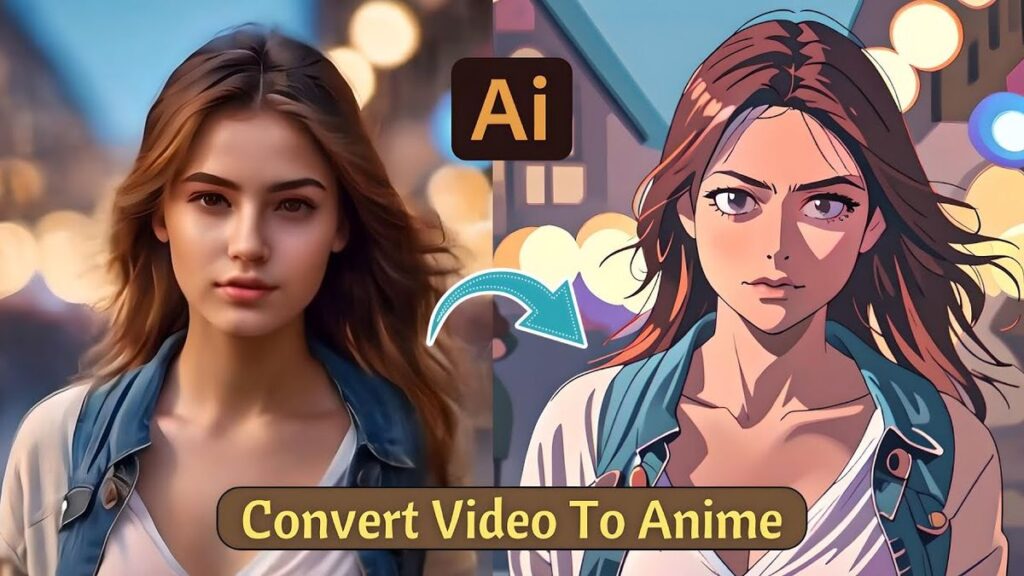
Another showstopper in this update is the Remix feature, which uses Google’s Imagen AI model to instantly transform your photos into various visual styles, including:
- Anime characters
- 3D art
- Comics
- Sketches and cartoons
In seconds, an ordinary selfie becomes a share-worthy piece of digital art. This is perfect for fun, nostalgia, and even content creation for influencers and creators.
How to Remix Your Photos:
- Open any photo in your Google Photos app.
- Go to the new “Create” tab.
- Choose “Remix”.
- Pick from a variety of styles such as anime, 3D, or comic sketch.
- Wait a few seconds — your artistic transformation is ready.
With SynthID digital watermarking, all AI-generated images and videos will have an invisible tag (and visible video watermarks) to maintain transparency and discourage misuse.
🔐 Privacy, Safety & Transparency First
Google isn’t taking AI creation lightly. The company has put serious safety checks in place, including:
- Red teaming to identify potential misuse.
- Extensive evaluations to ensure ethical use.
- Digital watermarks (SynthID) to distinguish AI-generated media.
All AI-generated content in Google Photos, including videos and stylized photos, includes transparent watermarking, so users always know what has been enhanced or generated by AI.
📱 When & Where Can You Access These Features?
As of now, these AI tools are:
- Rolling out in phases across the United States
- Available on both Android and iOS
- Accessible from the “Create” tab inside the Google Photos app.
Google has stated that Remix will be available in the coming weeks, while the Photo to Video tool is already beginning its U.S. rollout. International expansion is likely in the near future.
📢 User Feedback Will Shape the Future
Both tools are labeled “experimental”, meaning Google is actively collecting user feedback to refine and improve them. You can:
- Give a thumbs-up or thumbs-down on generated videos or remixed images.
- Expect regular updates and new styles or animation prompts.
- Help shape the future of AI in photography with your reactions.
🌟 Why This Update Matters
This update isn’t just a gimmick — it represents a shift in how we interact with our photos. Instead of simply scrolling through old images, you can now:
- Relive moments through motion.
- Reimagine yourself as a character in a comic or anime.
- Add flair and personality to family photo albums.
- Create social media content in seconds.
By integrating advanced AI models like Veo 2 and Imagen into a mainstream app like Google Photos, Google is democratizing creative technology, giving everyone — not just designers — the power to turn memories into mini masterpieces.
📌 Final Thoughts: The Future of Memories is Here
With the launch of AI-generated videos and Remix styles, Google Photos is transforming from a storage utility to a powerful creative platform. These tools bring a new level of engagement and joy to your personal photo collections.
Whether you want to surprise a loved one with an animated memory or share an anime-style family portrait online, Google Photos’ AI tools make it simple, fun, and meaningful.
So, next time you’re feeling nostalgic, open up Google Photos — your memories are just a tap away from becoming living works of art.
✅ Quick Recap
| Feature | Description | Technology | Rollout |
|---|---|---|---|
| Photo to Video | Animate still images into 6-second videos | Veo 2 | U.S. (Live Now) |
| Remix | Turn photos into anime, 3D, comics, and more | Imagen AI | U.S. (Coming Weeks) |
| Transparency | SynthID watermarks ensure responsible use | SynthID | Included in all AI outputs |