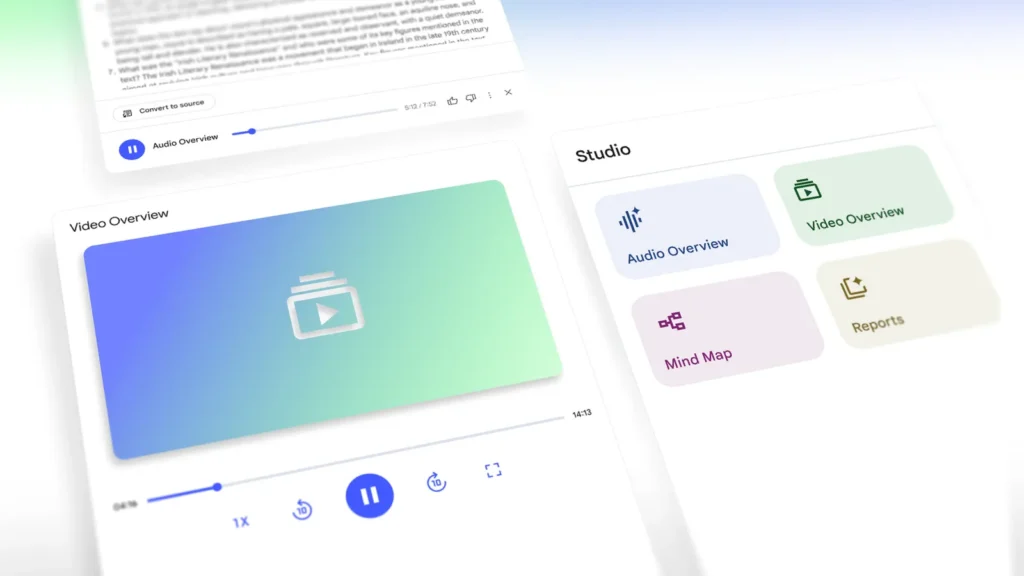
📢 Google has just taken a significant step in enhancing digital learning with the launch of the Video Overviews feature in its NotebookLM platform. This new addition takes the popular AI-driven learning tool to the next level by integrating narrated slide presentations that bring content to life with a combination of visual storytelling and AI-generated summaries.
Previously, users could only access Audio Overviews—AI-hosted podcast-style summaries designed to help with content digestion. However, Video Overviews offer an engaging alternative by transforming written material into dynamic visual aids. Whether you’re a student trying to make sense of academic papers or a professional working through detailed reports, this new feature is designed to make complex information clearer and more accessible.
In this article, we’ll explore how Google’s Video Overviews are changing the way we interact with content, their impact on education, and how users can leverage this tool to boost their learning productivity.
What are Google’s Video Overviews in NotebookLM?
🎥 Introduced as a part of Google’s NotebookLM platform, Video Overviews are a feature designed to create narrated slide presentations that simplify complex documents, reports, and academic papers. Unlike the previous Audio Overviews, which only featured voice-based summaries, Video Overviews include images, diagrams, quotes, statistics, and other visual elements from the document to create a richer, more interactive learning experience.
This new tool is particularly beneficial for visual learners who may struggle with long-form text or those who prefer to absorb information through visuals rather than reading. By automating the creation of slides that summarise key points in an easy-to-digest format, Google NotebookLM empowers users to consume content more effectively and efficiently.
Key Features of Video Overviews in Google NotebookLM
- Narrated Slide Presentations:
- 🗣️ The Video Overviews feature creates slides that summarise the key elements of your content. These slides are narrated by an AI-powered voice that explains the visuals and key takeaways, making it ideal for users who benefit from both audio and visual input.
- Automated Visual Content:
- 🤖 The AI technology behind NotebookLM extracts essential elements from your document, such as diagrams, images, charts, and statistics. These are then incorporated into the video slides, providing a complete visual experience that enhances the learning process.
- Customization for Specific Learning Goals:
- 🎯 One of the standout features of Video Overviews is their customizability. Users can define learning objectives, select key topics, and even tailor the content to suit a specific audience. Whether you’re trying to grasp a new subject or focus on particular aspects of a document, this flexibility allows you to create personalized learning experiences.
- Focus on Visual Learners:
- 👁️ The integration of images, diagrams, and other visual elements ensures that the content resonates with visual learners. By breaking down complex topics into digestible visuals, the tool makes understanding difficult concepts much easier.
- Multilingual Support (Future Updates):
- 🌍 While the feature is currently only available in English for desktop users, Google plans to expand the Video Overviews tool to support additional languages shortly. This expansion will make the tool more accessible to global audiences.
- Seamless Integration with Other NotebookLM Tools:
- 🔄 The new video tool integrates smoothly with other NotebookLM features, including Audio Overviews, Mind Maps, Study Guides, and Reports. Users can now create and store multiple types of outputs in a single notebook, making it easier to manage all your learning resources in one place.
How Video Overviews Enhance Learning: A Game-Changer for Students and Professionals
1. Simplified Learning Process
📚 For students, reading lengthy academic papers or textbooks can be time-consuming and challenging. With Google NotebookLM’s Video Overviews, these texts are broken down into concise, visual summaries that help students better understand the material. The narrated slides offer explanations, making it easier to grasp abstract concepts and complex theories.
2. Efficient Time Management
⏰ Professionals often find themselves dealing with large volumes of data and reports. The Video Overviews tool helps save time by distilling important information into a visual format, allowing busy professionals to quickly absorb key details without having to read through entire documents.
3. Improved Retention and Engagement
🧠 Visual learning has been shown to improve information retention and engagement. By combining audio narration with visuals, users can engage with the content more effectively, making it easier to recall important information when needed. Whether you’re studying for an exam or preparing a presentation, the ability to visualize concepts significantly enhances understanding.
4. Versatility Across Industries
💼 Google’s Video Overviews are not limited to students and researchers; professionals in various industries can also benefit from this tool. Whether you are working in business analytics, engineering, medicine, or marketing, the ability to create engaging video summaries from technical documents makes it easier to communicate complex ideas to your team, clients, or stakeholders.
5. Customizable Content for Different Audiences
👥 The tool allows users to customize the output based on their audience. For example, suppose you’re a subject matter expert. In that case, you can instruct NotebookLM to focus on advanced topics, while beginners can ask for simpler explanations. This customization ensures that the content resonates with the intended audience, whether it’s a colleague, client, or student.
Why Should You Start Using Video Overviews in Google NotebookLM?
As more and more learning and professional tools adopt AI, Google NotebookLM stands out with its comprehensive suite of features designed to cater to different learning styles. Here are a few reasons why you should start using Video Overviews today:
- Enhance Your Learning Efficiency – Instead of reading long reports, create narrated slides that break down information and allow you to focus on key points quickly.
- 🔍
- Boost Productivity – By storing multiple outputs within a single notebook, you can work on different projects simultaneously and access tailored content on demand.
- ⚡
- Leverage AI for Better Understanding – With the help of AI, you can create presentations that visually highlight important data and concepts, making complex topics more understandable.
- 🤓
- Collaborate and Share Knowledge – You can use NotebookLM to create a set of videos tailored to different roles or languages, making knowledge sharing easier across teams or with a global audience.
- 🌐
- Stay Ahead of the Curve – As AI tools like Video Overviews continue to evolve, mastering these features early can give you a significant edge in academic or professional settings.
- 🚀
Conclusion: The Future of Learning with Google NotebookLM
✨ The introduction of Video Overviews in Google NotebookLM marks a significant milestone in the evolution of digital learning tools. With the combination of narrated slides, automated visuals, and AI-powered customisation, this feature is poised to revolutionise the way students, professionals, and educators engage with content. Whether you are simplifying complex reports, creating study guides, or generating professional presentations, Google NotebookLM now offers an even more dynamic and efficient way to consume and share information.
If you haven’t yet explored the world of Google NotebookLM, now is the perfect time to dive in and take advantage of its powerful features to enhance your learning journey.
Get Started with Google NotebookLM Today!